
23.1. The "Hanging protocol" Tab
The Hanging protocol tab (Fig. 23.1) of the Image viewer settings window is used to manage hanging protocols. In this tab, you can enable and disable protocols, create custom protocols, including protocols based on existing ones, delete custom protocols, and import and export protocols in DICOM format.
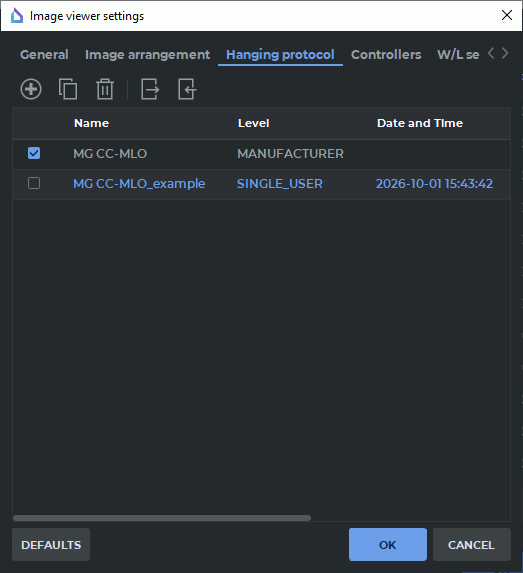
The protocol table displays built-in predefined protocols (presets) and custom protocols added to the storage. Custom protocols are saved in the storage directory of the DICOM Viewer.
The first table column specifies whether a protocol is active. To activate a protocol, check the box next to it in the first column; to deactivate it — uncheck the box. If a protocol is active, the DICOM Viewer considers it when searching for a suitable protocol for a series being opened in the Image viewer tab. If a protocol is inactive, it remains in the storage and is displayed in the table, but does not participate in automatic layout selection.
The following table columns display protocol names, levels, and creation times. The Layouts column shows the number of layouts defined in each protocol. To view detailed protocol information, hover the cursor over its table row.
 | The protocol level, creation date and time, display environment requirements, and internal DICOM parameters are set by the program. Built-in presets use the MANUFACTURER level, while custom protocols — use the SINGLE_USER level. |
The following actions are available in the tab:
-
 Create new — opens the New hanging protocol dialog box for creating a
custom protocol;
Create new — opens the New hanging protocol dialog box for creating a
custom protocol;
-
 Create a copy — creates a custom protocol based on the selected protocol. Use this
command if you need to change a built-in preset: the original preset remains unchanged,
and changes are made to the created copy;
Create a copy — creates a custom protocol based on the selected protocol. Use this
command if you need to change a built-in preset: the original preset remains unchanged,
and changes are made to the created copy;
-
 Remove — deletes the selected custom protocol from the table and storage;
-
 Export to DICOM — saves the selected custom protocol to a DICOM file;
-
 Import from DICOM — adds a hanging protocol from a DICOM file to the
storage.
Import from DICOM — adds a hanging protocol from a DICOM file to the
storage.
| | Built-in presets cannot be deleted. Exporting a built-in preset to a DICOM file is unavailable. To export a protocol based on a preset, create a custom protocol as a copy of the preset and export the created copy. |