
3.2. Stereo Image Viewing
____________________________________________________________________________________________
Functionality is available in the Pro edition
____________________________________________________________________________________________
 | Viewing stereo images requires a monitor that supports stereo image output and the glasses supplied with the monitor. |
The DICOM Viewer allows you to display a stereo image of a volume reconstruction on a separate monitor selected in the Screen settings section (see Section 18.5.3).
If a stereo monitor is selected in the Screen section, the Stereo view window...
 button becomes available on the toolbar of tabs containing volume reconstruction
windows.
button becomes available on the toolbar of tabs containing volume reconstruction
windows.
To open the stereo image window, click the Stereo view window... button on the toolbar.
A full-screen window opens on the selected stereo monitor, displaying a stereo pair generated for the
volume image in the current window. The stereo image window is displayed on top of other windows
on the stereo monitor.
When the volume image in the main window changes, the stereo image is updated automatically. To close the stereo image window, toggle off the Stereo view window... button on the toolbar, or close or hide the tab from which the stereo image was opened.
Stereo image viewing is available in the Volume reconstruction, Virtual endoscopy, Vessel analysis, and Coronary artery analysis tabs. In the MPR reconstruction tab, the button is available if the 3D view window is open.
3.2.1 Stereo Projection Parameters
____________________________________________________________________________________________
Functionality is available in the Pro edition
____________________________________________________________________________________________
To open the stereo projection parameters dialog box (Fig. 3.2), click the arrow on the
Stereo view window... button and select the Stereo settings... command. The
dialog box is nonmodal: you can continue working with the DICOM Viewer while it is
open.
In the dialog box, select the method for generating the stereo image:
-
Off axis. This method is not available for parallel projection;
-
Toe in.
The Eye distance parameter is specified for each method. The value is dimensionless and ranges from 0.0001 to 0.1. The parameter values for the Off axis and Toe in methods are configured independently.
For the Toe in method, the Eye-contact angle parameter is also specified. The value is given in degrees and ranges from 0.01 to 10.
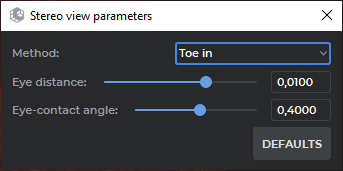
The following values are used by default:
-
for the Off axis method: the Eye distance parameter is 0.01 for volume reconstruction and 0.005 for virtual endoscopy;
-
for the Toe in method: the Eye distance parameter is 0.01 for volume reconstruction and 0.003 for virtual endoscopy;
-
for the Toe in method: the Eye-contact angle parameter is 0.4 for volume reconstruction and 1 for virtual endoscopy.
When the method or the parameters of the selected method are changed, the stereo image is updated immediately if the stereo image window is open. The selected values are saved between program sessions. Volume reconstruction windows, including the 3D view window in the MPR reconstruction tab and in vessel analysis windows, share the same parameters. Parameters for the Virtual endoscopy window are configured and saved separately.
To restore the default values for the current method, click the DEFAULTS button.